


Endless Truck
Drive a monster truck across an endless track, jump obstacles and perform flips while collecting cash and fuel. Complete 57 mission objectives and upgrade your engine, body, wheels, fuel tank and bullbar. Progress is saved in this browser.
How to play Endless Truck
Enter the garage and use the right-arrow button to start. The truck accelerates automatically; jump obstacles and rotate in the air to line up your landing.
Collect fuel to keep driving and cash for the garage. Work through mission objectives and improve the engine, body, wheels, fuel tank and bullbar.
Endless Truck game modes
- Endless driving. Keep driving while working through 57 mission objectives.
Tips and tricks
- Straighten the truck before landing after a flip.
- Prioritize fuel pickups when your tank is running low.
Endless Truck fuel, missions and upgrade guide
The truck accelerates automatically. Your first job is to time jumps, land on the wheels and collect fuel; cash and mission rewards give you options when you return to the garage.
How do I start a run and land a jump?
Use the right-arrow button on the title screen to enter the garage, then its right-arrow button to start driving. These are on-screen menu buttons; during a run, the keyboard arrows rotate your truck.
- Let the truck build speed automatically and watch the track ahead. You do not need to hold an accelerator.
- Press Space to jump an obstacle. Use the left and right arrows in the air to adjust the truck's angle.
- Bring the wheels toward the track before landing. Practise a clean jump before holding rotation long enough for a flip.
- Collect fuel as well as cash. A longer stunt is not useful if it makes you miss the fuel or crash on landing.
What should I do when fuel keeps ending my run?
Watch the fuel display and plan your jumps around fuel pickups. Avoid rotating through every ramp: a controlled landing makes it easier to reach the next pickup and continue the run.
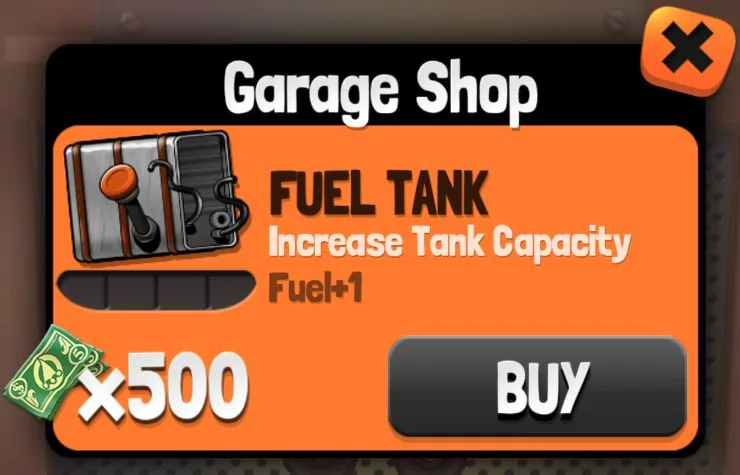
Back in the garage, open the fuel-tank icon and read its next upgrade and price. Compare the cost with your earned cash before buying. A tank upgrade and collecting fuel during a run are separate parts of managing your range.
How should I choose a garage upgrade?
The garage has separate icons for the engine, body, wheels, fuel tank and bullbar. Open an icon to inspect its current offer, then decide whether that upgrade addresses what is stopping your runs. Prices depend on the part and its next tier.
If fuel is your main limit, inspect the tank first. If you keep crashing after jumps, practise landing before spending all your cash: upgrades do not replace control of the truck's angle. You can inspect a part without buying it.
Spend cash earned through ordinary runs and mission rewards. Choose an upgrade you can afford, then try another run to see how it changes your driving.
How do missions fit into endless driving?
The game has 57 mission objectives across its progression. Read the active objectives and work toward them during your runs; they are goals within endless driving, rather than 57 separate tracks to select from a level menu.
Choose one objective to concentrate on while maintaining fuel and safe landings. A distance attempt and a stunt attempt can call for different timing, so do not force every possible trick into the same run.
On a phone or tablet, turn the device sideways and use the game's touch buttons. Progress is stored in this browser; clearing the site's stored data can remove local progress.
More games like this
Explore more racing games, or choose another game from Play next.
- Cars Arena — Switch from racing lines to surviving a car arena.
- PolyTrack — Chase a faster time on loops and jumps, or experiment with the track editor.
- Kart Bros
- Drive Mad
Controls
PC controls
- Use the right-arrow button on the title screen to enter the garage, then again to start
- The truck accelerates automatically; press Space to jump
- Use the left and right arrow keys to rotate the truck in the air
- Collect fuel to keep driving and spend earned cash on upgrades in the garage
Touch controls
- On mobile, turn your device sideways and use the on-screen touch buttons
FAQ
Do I need to hold an accelerator?
No. The truck accelerates automatically. You control jumping and rotation.
What can I upgrade?
The garage offers engine, body, wheel, fuel-tank and bullbar upgrades using earned cash.