
Sprunki
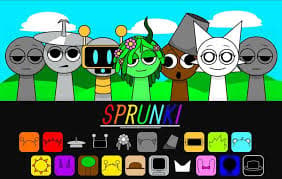
Drag sound icons onto a row of characters and build your own music mix. Each character adds a beat, melody or voice, so you can layer them, mute them and restart until the song sounds right.
How to play Sprunki
Drag any icon from the bottom of the screen onto one of the grey characters. The character changes and starts adding its sound to the loop, in time with the others.
Keep adding icons to build a song. Use the buttons on a character to mute it, listen to it alone or remove it, and use the reset button in the top corner to start again.
Sprunki game modes
- Mix. Layer up to seven characters on the stage to make your own song.
- Gallery. Open the gallery from the top of the screen and move through it with the arrow keys.
Tips and tricks
- Start with one or two beats, then add melodies on top so you can hear what each one does.
- Listen to one character alone before you decide whether to keep it.
- Icons you have used are dimmed, so you can see which sounds are already in your mix.
More games like this
Explore more casual games, or choose another game from Play next.
- Knife Rain — Practice the timing of each throw.
- Cube Split
- Stack Ball — Try a short arcade challenge built around timing.
- Brain Enhancer
Controls
PC controls
- Mouse: drag an icon onto a character to add its sound.
- Hover over a character for its mute, solo and remove buttons.
- Space: reset the mix.
- Left and right arrow keys: move through the gallery.
Touch controls
- Mouse: drag an icon onto a character to add its sound.
- On touchscreens: drag icons with your finger.
FAQ
How do you play Sprunki?
Drag an icon onto a character. Each one adds its own sound to the loop, and together they make a song.
How do I start over in Sprunki?
Press Space or the reset button in the top corner.
How many characters can I use at once?
The stage has seven characters, and each one takes one icon.
Does Sprunki save my mix?
No. The game does not store your mix, so it starts fresh each time you open it.