


Rocket Goal.io
Car soccer with rocket boosts. Drive across the pitch, launch off the walls and ceiling for aerial shots, and outscore other online players in quick matches where speed and timing decide the result. Some players search for it as Rocketgoal io or Rocket Goal i.o.
How to play Rocket Goal.io
Drive your rocket-powered car into the ball and knock it into the opponents' goal. Everyone is chasing the same ball, so get to it first and keep up the pressure.
Your car can drive up the walls, along the ceiling, flip and jump. The controls are sensitive, so practise boosting and aerial moves until you can control the ball in the air.
Rocket Goal.io game modes
- Practice. Drive alone on the pitch to learn boosting, jumping and ball control.
- Online matches. Join matches against other players online.
- Private match. Create a private match and play with your friends.
Tips and tricks
- Learn the car in Practice before joining online matches.
- Use the walls to keep the ball in play and set up shots when opponents crowd the middle.
Rocket Goal.io controls and getting-started guide
Learn ground control in Practice before trying aerial shots or an online match. Rocket Goal.io, shown in-game with a Rocket Ball logo, uses K to jump and J to boost; Space changes the camera, so it does not work like the jump key in many other driving games.
What should I practise before an online match?
Choose Practice from the lobby to drive alone with the ball. Start by approaching it slowly and lining up a shot toward the goal. Keeping the ball in front of your car is more useful at first than holding boost through every turn.
- Drive toward the ball with W or the up arrow, then steer with A/D or the left/right arrows. Use S or the down arrow when you need to reverse.
- Try a short boost with J or the left mouse button while driving straight. Learn how much it changes your approach before combining it with a jump.
- Press K or the right mouse button to jump. Begin with a controlled landing before attempting a flip or wall approach.
- Use Backspace to reset the ball in Practice and repeat the same approach. Press P or Escape to return to the menu when you are ready to choose another mode.
Where can I check or change the controls?
Open the gear button in the lobby, then choose Edit Controls. The panel separates Actions, Keyboard, Mouse and Controller. Read your current assignments there if a key does something different from the defaults below.
The checked controls distinguish Roll, bound to Q/E, from AirRoll, bound to Left Shift. Space is BallCam. Learn jumping, steering and camera control before adding these aerial inputs.
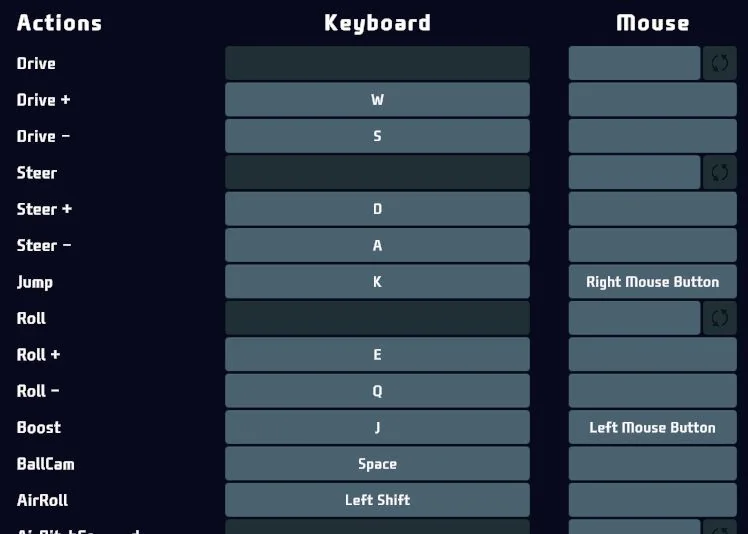
| Action | Keyboard or mouse |
|---|---|
| Drive and reverse | W/S or up/down arrows |
| Steer | A/D or left/right arrows |
| Jump | K or right mouse button |
| Boost | J or left mouse button |
| Ball camera | Space |
| Roll | Q/E |
| Air roll | Left Shift |
How do I keep track of the ball or get off a wall?
Press Space to switch the ball camera. Compare the views in Practice while circling the ball, then use the view that helps you judge your approach. A camera change does not jump the car.
If you are stuck against a wall or inside a goal, use K or the right mouse button to jump away. Once free, straighten the car and return to a ground approach before trying another aerial move.
How do I join a friend in Rocket Goal.io?
Open Party on the right of the lobby. Its panel shows the selected region, a code field, Join and Create. One player uses Create and shares the resulting code; the other enters that code and chooses Join.
Check the region on both players' Party panels. If they differ, open the lobby's gear button and select the same region before trying the code again. Entering an ordinary online match with Play is a separate choice from joining by code.
On a phone, use landscape orientation and the game's on-screen controls. Desktop keyboard bindings in the table do not describe the positions of its touch buttons.
More games like this
Explore more sports games, or choose another game from Play next.
- Golf Rush — Read the hole and practice the direction and power of each shot.
- Blitz Ballers — Control a footballer in an online match or a private lobby.
- Basket Random
- Wrestle Bros
Controls
PC controls
- WASD or the arrow keys: drive.
- Left mouse button or J: boost.
- Right mouse button or K: jump. Jumping also frees you from a wall or the goal.
- Shift: drift. Q and E: air roll. Space: switch camera.
- A controller also works. Choose the Europe or USA server in Settings.
Touch controls
- Mobile: use the on-screen joystick and buttons, in landscape.
FAQ
How do I get unstuck from a wall?
Press K to jump off the wall or out of the goal.
Can I play with friends?
Yes. Start a private match and invite your friends.
Is Rocketgoal io the same game as Rocket Goal.io?
Yes. Rocketgoal io and Rocket Goal i.o are other ways people search for Rocket Goal.io, and this is the game they mean.