
Speed Stars
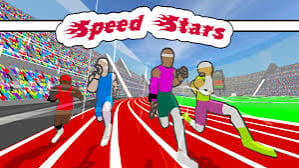
Sprint the 100m dash by pressing left and right in rhythm to run and keep your balance. Manage your energy and cadence, chase your personal best and climb the worldwide leaderboard.
How to play Speed Stars
Wait for the start, then press left and right one after the other to run. Keep a steady rhythm, because pressing too wildly throws your runner off balance.
Watch the Energy and Cadence bars at the top of the screen while you race. When you finish, the results show your time, your personal best and the world record.
Speed Stars game modes
- 100m dash. Race seven other runners to the finish and post a time on the leaderboard.
- Practice. Work on your rhythm without racing for a result.
- High Scores. See the best times, and your place worldwide.
- Edit Racer. Change how your runner looks.
Tips and tricks
- Find a steady left-right rhythm before trying to go faster.
- Watch the Cadence bar to see how quickly you are stepping.
- Use Watch Replay after a race to see how you ran.
More games like this
Explore more sports games, or choose another game from Play next.
- Golf Rush — Read the hole and practice the direction and power of each shot.
- Blitz Ballers — Control a footballer in an online match or a private lobby.
- Rocket Goal.io — Try car soccer when you want a mix of driving and ball control.
- Basket Random
Controls
PC controls
- Left and right arrow keys or A and D: run.
- Mouse: menus.
Touch controls
- On touchscreens: use the on-screen controls.
FAQ
What are the controls for Speed Stars?
Press the left and right arrow keys, or A and D, one after the other to run.
How do I run faster in Speed Stars?
Keep a steady left-right rhythm. Watch the Cadence bar, and keep enough Energy to reach the finish.
Is there a leaderboard?
Yes. Your time goes on a worldwide leaderboard, and the results screen shows your personal best and the world record.
Do I need to download Speed Stars?
No. It runs in your browser.